
| The Maine Public Utilities Commission (PUC) approved new rates beginning in July to reflect increases in distribution and transmission rates for customers of Maine’s electric utilities. Some of the increase was the result of storm damage incurred over the past two years. The PUC also approved an increase in the stranded cost portion of electric bills to recover solar project subsidies and program costs of the Net Energy Billing program. On average, the new increases will cost ratepayers between $10-$17 per month, depending upon your provider. Several programs are available to assist qualifying residents with their electricity bills. Two such programs are the Low-Income Energy Assistance Program (LiHEAP), administered by the Maine Housing Authority (MaineHousing), and the PUC’s Low-Income Assistance Program (LIAP). Applications for both LiHEAP and LIAP are administered by your local Community Action Partner (CAP) agency. You can apply for energy assistance beginning in July for the 2024-2025 season at your local CAP office found here. Visit MaineHousing’s website for more information about the application process. Another program to aid those who are behind or “in arrears” with their electricity bill is the Arrearage Management Program (AMP), which can help reduce the past due balance. This program is also administered by the local CAP agencies. For a complete list of energy and heating assistance programs available, visit the Public Utilities Commission’s website. |
Author Archives: Peggy Bishop
Manage Your Money
New Ventures Maine (NVME) can help you:
- Learn to budget
- Repair your credit
- Create a savings plan
Our core financial education class:
- My Money Works
Other trainings:
- Budgeting Basics
- Let’s Talk About Credit
- Build Your Savings
- Your Money Personality
Matched Savings Programs
Rainy Day Savings Account
The Rainy Day Savings Account (RDSA) Program offers a matched savings account for income-eligible individuals and families who want to save money to pay for unexpected emergency expenses. This program matches each dollar you deposit in your RDSA, up to $400, with $1 from private donors.
FDA RDSA Income Guidelines 2024
Family Development Account
The Family Development Account encourages income-eligible working adults to save for a major purchase. Please contact your local NVME office for details and to apply.
Family Development Account Q&A 2024
Related Classes
| Class | Date | Program Area | Location | Region |
|---|---|---|---|---|
| Matched Savings Information Session | July 01, 2024 | Manage your Money | ONLINE Evening | Statewide |
| My Money Works | July 30, 2024 (ends August 27, 2024) | Manage your Money | ONLINE Daytime | Statewide |
| Budgeting Basics | August 21, 2024 | Manage your Money | ONLINE Evening | Statewide |
| Let’s Talk About Credit | August 28, 2024 | Manage your Money | ONLINE Evening | Statewide |
| Build Your Savings | September 04, 2024 | Manage your Money | ONLINE Evening | Statewide |
| My Money Works | September 11, 2024 (ends October 09, 2024) | Manage your Money | ONLINE Evening | Statewide |
| Budgeting Basics | October 16, 2024 | Manage your Money | ONLINE Daytime | Statewide |
| My Money Works | October 22, 2024 (ends November 19, 2024) | Manage your Money | ONLINE Daytime | Statewide |
| Let’s Talk About Credit | October 23, 2024 | Manage your Money | ONLINE Daytime | Statewide |
| Build Your Savings | October 30, 2024 | Manage your Money | ONLINE Daytime | Statewide |
| My Money Works | November 05, 2024 (ends December 03, 2024) | Manage your Money | ONLINE Evening | Statewide |
| My Money Works | December 02, 2024 (ends December 30, 2024) | Manage your Money | ONLINE Daytime | Statewide |
Helping Maine people succeed in the changing economy and achieve economic security for themselves and their families.
© 2024 New Ventures Maine • All Rights Reserved.
New Ventures Maine
Within Maine Toll Free: 800.442.2092
Maine Office: 207.621.3440
[email protected]


Legal Services for Maine Elders
Our Mission. Since 1974, we have been protecting the rights of older Mainers. Our mission is to provide free, high quality legal services to people who are 60 and older when their basic human needs are at stake and advocate for people facing challenges accessing Medicare benefits.
Our Helpline and Staff Attorneys. People who need help can call our toll free Helpline and speak with an attorney. We can help answer questions over the phone. We might also write letters or speak to a third party. Depending on the problem, a Staff Attorney may be able to help with a court or administrative proceeding.
Our staff can also help you find other legal or social services support if we can’t help. This includes our Reduced Fee Panel of attorneys who we trust. They are located throughout Maine and can help older Mainers who otherwise would not be able to afford an attorney. They provide these services for a reduced or flat fee basis.
Our Health Insurance Counseling Program. This program gives information and help with the healthcare system through our Helpline. Older people and disabled people who are under 65 and have Medicare can use this service. We offer this program with our partners at the Office of Aging and Disability Services and the Area Agencies on Aging. It is funded by a grant from the Centers for Medicare and Medicaid Services.
Senior Medicare Patrol. Maine SMP educates Mainers with Medicare, their families, and caregivers about Medicare benefits. Maine SMP volunteers help consumers understand their Medicare statements and learn about healthcare fraud, waste, and abuse. They help file fraud and abuse claims with Medicare and also present to community groups. We offer this program with our partners at the Office of Aging and Disability Services and Maine’s Area Agencies on Aging. Please call your local Area Agency on Aging to ask about Maine SMP.
Our Reduced Fee Attorney Panel. As described above, through generous involvement of the private bar, we have established a statewide panel of attorneys who have agreed to provide representation on a variety of matters on a reduced fee or flat fee basis.
Our Medicare Part D Appeals Unit. Our Medicare Part D Appeals Unit helps low-income Mainers who have Medicare. The Unit helps people get the prescription drugs they need.
For more information about Legal Services for the Elderly, contact www.maine else.org
Helpline 1-800-750-5353.
How to Protect Yourself from Utility Scams
Common tactics criminals use and what to do if you’re targeted
You could swear you paid that last gas and electric bill. But the caller from the power company is adamant that you’re overdue and says if you don’t pay up now, your water, gas or electricity will be cut off within 10 minutes — the last thing you want in the chilly dead of winter (or the long, hot summer, as the case may be). Best not to risk it.
Whatever your demographic, be assured: “A utility company will never call and tell you they are going to shut off service in minutes,” Martinez says.
Though utilities try to stay ahead of the curve and share information about scams with the public, the best way consumers can protect themselves is to be proactive, not reactive, McKissick says. To become an educated consumer, be aware of these nine additional utility scams:
1. Refunds for overpayment
Rather than claiming you owe money, scam callers might say you’ve overpaid, and they’ll ask for bank account or credit card information to make a “refund.” In order to “process” your money, they’ll ask you for a credit card number to get your financial information, Martinez says.
2. Free energy audits
Workers may arrive and offer to give you a free “audit” for energy efficiency in order to gain entry to your house.
3. Offers to lower energy costs
You may get an email or see a social media post with an offer to sign you up for a government program that reduces energy bills or a charity that will help pay bills. Scammers often ask for a small “donation” of $50 as a service charge or to pay the good deed forward, Martinez says. The scammer’s aim is to collect personal information for use in identity theft.
4. Offers to switch service
Criminals may offer to switch services for you on the spot, pressuring you to sign a contract. Or they may offer to install alternative energy equipment, such as solar panels, and mention tax benefits, saying they need your financial information to tell you how much you’ll save.
They may offer financing and want you to fill out an application. “Their objective is to steal your information. Don’t be pressured by these tactics,” McKissick says. “Take their information if you want, but don’t give them yours..”
5. Charges to restore power after natural disaster
During a service outage, scammers may pose as utility workers wearing vests and carrying walkie-talkies — easily bought online — and offer to put you on a preferred list to restore service quickly or claim they need a reconnection fee to restore service. “We see an uptick of these happening when there is a crisis situation,” Martinez says.
Crooks try to lure people into giving personal information or to hand over money. Utilities do not require reconnection fees in crisis situations, nor do they offer priority service restoration, McKissick and Martinez emphasize.
“No one is going to knock on your door and demand money. This is not a tactic utility companies use,” McKissick says.
6. Investigating emergency leaks, fixing or checking equipment on your property
Scammers may knock on your door posing as utility workers telling you they need to fix what they claim is an emergency gas leak or to inspect new equipment. “They get wind that (a utility company) is putting in new meters like smart meters,” Martinez says.
Scammers often follow in the wake of installations and tell customers they need to pay a fee to get the meter double-checked, often presenting it as a safety issue.
7. Impostor texts and emails
Utility impostors send out phishing emails or smishing text messages aimed at convincing you to make a payment or supply personal or financial data to sort out a service issue.
8. Fake websites
A growing scam involves online ads that appear to be from utility companies offering service or easy ways to pay, sometimes including QR codes that claim to link to payment pages. “We’re seeing a lot of this with new customers because you’re more likely to hop online and search ‘who’s my utility?’ ” Martinez says.
If you are looking for new service, check your state utility commission and local chamber of commerce for lists of companies that provide service
9. Opening accounts in your name
Identity thieves use stolen personal information to open utility accounts and run up charges in the victim’s name. AARP’s The Perfect Scam podcast reports on a new version. After her father died, a woman received a letter from criminals posing as the local utility company instructing her to switch the household electricity account from her father’s name to her name. The criminals stole her personal financial information as they pretended to change the account name.
How to protect yourself
Stay calm. Scammers are good at making you panic, Martinez says. If you are told power is going to be cut off immediately, take a deep breath and remember that utilities do not cut off service without considerable advance warning. If callers demand payment immediately, that should be a red flag, McKissick says.
Call the utility’s customer service number. A representative can tell you if you are behind on a payment or if the utility tried to contact you. “Get the number from the actual bill you receive, not from a website or from a caller,” McKissick says. “Utilities companies have highly trained staff to assist the public, and they are the best source.” Martinez, who pays her bill online, says she keeps a digital copy of her bill on her phone in case she needs to call.
Beware of unusual payment requests. Utilities will never ask to be paid in gift cards, prepaid debit cards or cryptocurrency, McKissick and Martinez say. Never give money to a supposed utility company worker who shows up at your house.
Never share personal information with a caller. “Utility companies do not need your date of birth or your Social Security number. And they don’t need to know whether you are receiving Social Security,” McKissick says. “Usually the service address is what a utility company will ask you for.”
Ask for employee identification. Always request their employee identification number, and call the utility company to verify their ID and the reason for their visit, McKissick says.
Don’t click on unverified links. Don’t click on links in a utility-related email, QR code or text message unless you’re certain it’s from the real company.
Notify law enforcement, your utility company and your neighbors. If you’re being targeted, chances are others in your town are too. “[Scammers] tend to focus on one or two utilities in a region with a certain type of scam. Local law enforcement and utility companies can warn customers to be on the alert,” Martinez says.
What to do if you’ve been targeted in a utility scam
File a complaint with the FTC (online or at 877-382-4357) and report it to your state attorney general’s consumer protection office , state’s utility commission and your utility company.
Contact your bank to see if it can stop payment and put any necessary fraud watches on your account. The FTC has a guide with useful information on how you can try to get your money back
If someone has opened a utility account in your name, call the National Consumer Telecom & Utilities Exchange at 866-349-3233 to get a copy of your account history and dispute any inaccurate content. You can add an extended fraud alert if you have been a victim of this scam, so companies are required to verify any account opening with you for seven years.
For more on utility scams: Utilities United Against Scams offers information on utility-related impostor cons on its website and in its Consumer’s Guide to Impostor Utility Scams.
reprinted from AARP Fraud Watch Network
Travel Scams
| Summer is just around the corner, which has many of us looking forward to fun adventures and sunny escapes. But beware, criminals could be lurking on the other end of that enticing travel deal. Here’s what to know to help you avoid travel scams. |
| How It Works• You stumble onto a travel booking site that offers exclusive vacation deals, often for far below market value.•You find a posting for a luxurious vacation rental listing at a lower-than-expected price.•Your rental car search lands you on what appears to be the jackpot — a site offering fantastic deals.•You’re using a popular vacation rental app, and the host asks you to pay upfront and through a means that is off the platform. What You Should Know• Criminals create bogus travel sites that mimic legitimate ones and often appear toward the top of your search because they’ve bought paid promotions.•Scammers also use fake vacation rental listings that are often stolen from real listings and then altered. An unusually low price could be a sign that a listing is not legitimate.•Shady rental car sites may look like those of real companies, but the deals are fake. The thieves who set them up will simply take your money and then disappear.•A host who asks you to pay for your rental home outside of the app is not someone you want to do business with. What You Should Do• Be skeptical of any pitch that offers steep discounts on travel and accommodations.•Vet travel reservation sites before you book. Conduct a web search on the company name (along with the word “scam” or “complaint” or “review”) to read about other people’s experiences.•When renting a car online, type in the web address rather than using a search engine. This will reduce the chance of accidentally landing on a look-alike site.•Pay for travel reservations and bookings with a credit card, which offers greater protection than other forms of payment.•When using a vacation rental app, be suspicious if the host wants you to pay off-platform. For example, Airbnb only allows this for certain fees (such as local taxes), and VRBO states that payments outside its checkout form are not eligible for its “Book with Confidence” guarantee. Reprinted from AARP Fraud Watch Network |
Online Safety Guide for Senior Citizens
While you think of technology’s benefits to overcoming some of the challenges of aging – mobility, making friends, managing healthcare and reducing errands – it’s easy to fall prey to its dark side. Without realizing it, you may be opening yourself to theft, fraud, and even violence – particularly in these times of worldwide Pandemic.
Have you ever wondered how your internet usage stacks up to other seniors? Pew Research Center found that 67 percent of adults over age 65 go online regularly. The good news is that this number is up 14 percent from 2000. The bad news is that a third of older adults are missing out on the connection and convenience available through the internet.
If you are concerned about going online or do not take advantage of many opportunities only found online, you can become increasingly lonely and feel disconnected. A study by the National Academy of Sciences of the United States of America found that people over age 52 who are isolated have a higher risk of mortality.
You may know other seniors who stay off the internet because they are concerned about safety, do not know how to use it or don’t have someone to help them get started. Because of cybercrime along with crimes where people are targeted online and then victimized in real life, seniors are faced with a big quandary – risk isolation or risk being the target of cybercrime and fraud.
The Covid19 pandemic made things much dangerous: Many senior citizens turned to the internet in search of advice and critical health tips, but could fall victim to heartless criminals, just looking for such easy prey.
The answers are education and support. This thorough guide will help you learn about how to use technology and, most importantly, how to stay safe. If you are a senior, you might want to reach out to others in your life and go through this guide together. And if you have senior citizens close to you, take the opportunity to help them get started online.
1. Passwords: Your First Line of Defense
My mother-in-law has a love/hate relationship with passwords – she knows she needs passwords, but she has a hard time remembering the passwords she chooses. And every time we help her with an app or task, she can’t find the right password – which is frustrating for all involved. Let’s talk about why you need to have passwords, why they need to be different from each other, and how to help yourself remember your passwords.
If you live in an assisted living facility or use the computer at a senior center, you are likely using computers that other people use. And if you live in your own home, you may have people in and out of your house who help you with different tasks – perhaps a housecleaner, physical therapist, or health aid. You may also use the tablets other people use to order things online. While we hope that all these people are trustworthy, sometimes people close to us – even grandchildren – can be up to no good.
Because so many of our daily tasks are done on the computer – shopping, banking, healthcare – if these people are able to access your accounts online, they can do lots of damage if they have a mind to do so. They could order things online using your stored credit card information, outright steal your credit card information, or even steal your identity.
Creating Strong Passwords
One of the most important steps you can take to stay safe online is to create strong passwords. Your password can be stolen if someone close to you figures it out and gets access to your computer or accounts. And criminals use programs that can make it easier to figure out your passwords.
Each password should be unique, but there are ways to make it easier to remember.
Here are five things you should always do when creating passwords:
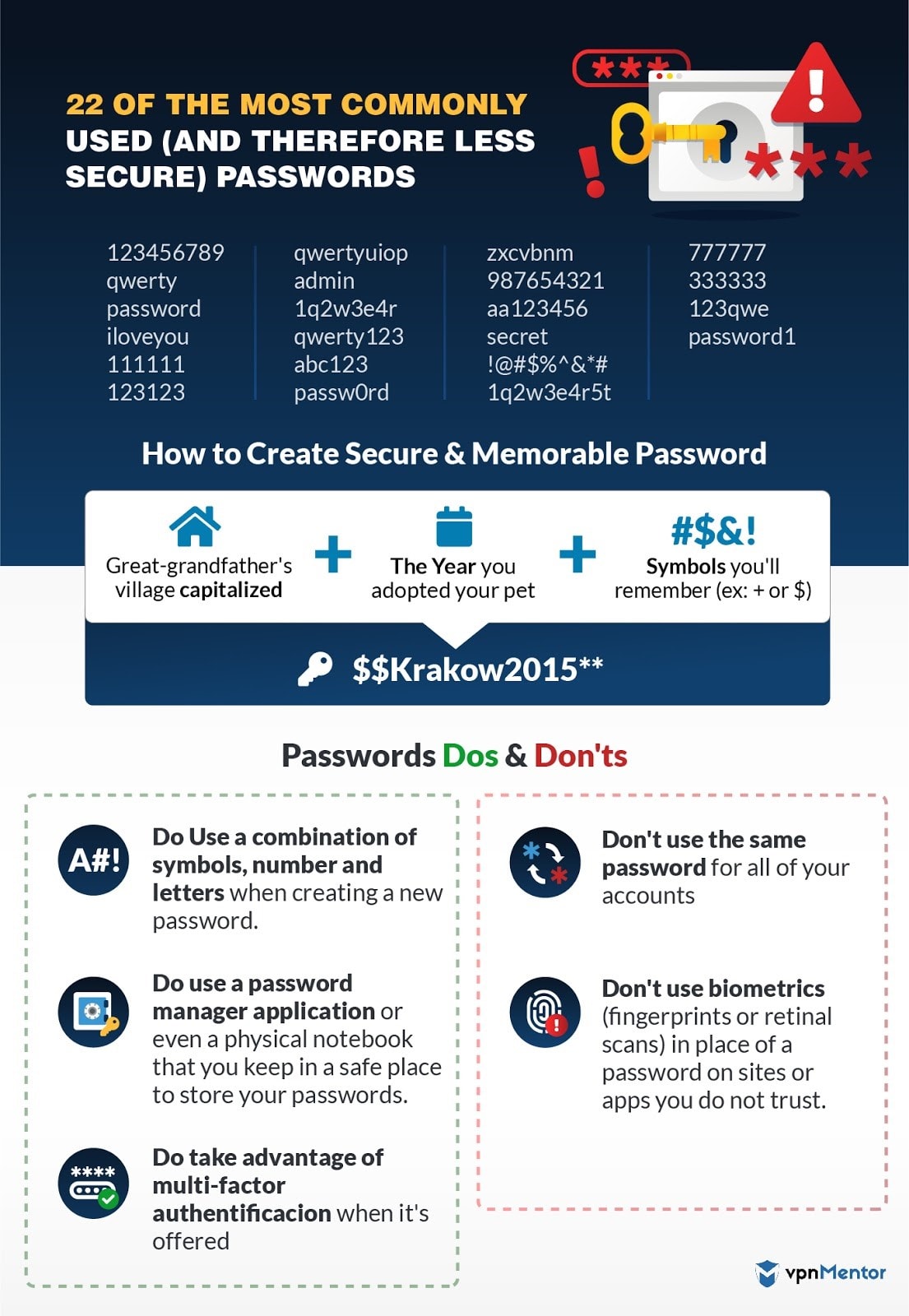
- Use a combination of letters, numbers and special characters, such as #$!@.
- Vary the case. You should include both lowercase letters and uppercase letters in all passwords. For extra safety, use the uppercase in the middle of the password, not just at the beginning.
- Don’t use names or numbers that people can figure out just by looking at your Facebook profile. Many people use their birthdays, dog’s name, or even their own name. Use words and combinations that only you will know – even better, use something random.
- Use VPN Mentor’s password generator to create secure passwords.
- Create passwords that make a sentence to make it easier to remember, such as Ilikeicecream!!.
And one thing to never do is use Password123, 123, 1234567890, or 1q2w3e4r as a password. Check out CNN’s most commonly hacked passwords to make sure you don’t use any of them.
Consider Facial Recognition or Fingerprints
You are the only person with your fingerprints and your retinas. While it may seem a bit creepy, using facial recognition or your fingerprint to access your computer or certain accounts is very effective against hackers and thieves alike. Some computer systems, like Windows Hello, on supported devices, can even scan your face and tell immediately if it’s you or someone else trying to use it. This makes it harder for people to break into your computer. So whenever you have the option to put this type of security on your computer or other devices, give it some serious consideration.
However, you also need to provide your family or a trusted friend the ability to access the device if you are sick or injured. If your phone has an Emergency Details section (type emergency of the search tab of your phone’s settings) be sure to put in emergency contact information. Most devices allow you to create a backup password that can be used to access the device as well as your main password. Yes, this does make it less secure, but it could be necessary. And some programs will let you grant access to specific people or make people use a second method to verify their access, such as sending a text to their cell phone.
Password Managers: More security, with Less to Remember
More and more people of all ages are using dedicated programs called password managers, such as LastPass or Dashlane nowadays. Senior citizens can make the most of these softwares like everybody else, to keep their computers safe while making passwords less frustrating. If you are like most people and passwords are hard to remember, then a password manager can be especially helpful.
The way password managers work is that you install the program on your computer and then you enter all of your passwords for programs, accounts and anything else into the program. Then you create a single password for the password manager.
When you go to a website or program that you’ve set up in the password manager, it asks you the password only for the password manager and grants you access to your account. You have the security of many different passwords, while you only have to remember a single password. And be sure to share this password with a trusted friend or family, then they can access all of your accounts with a single password in an emergency.
2. Keeping the Viruses Away
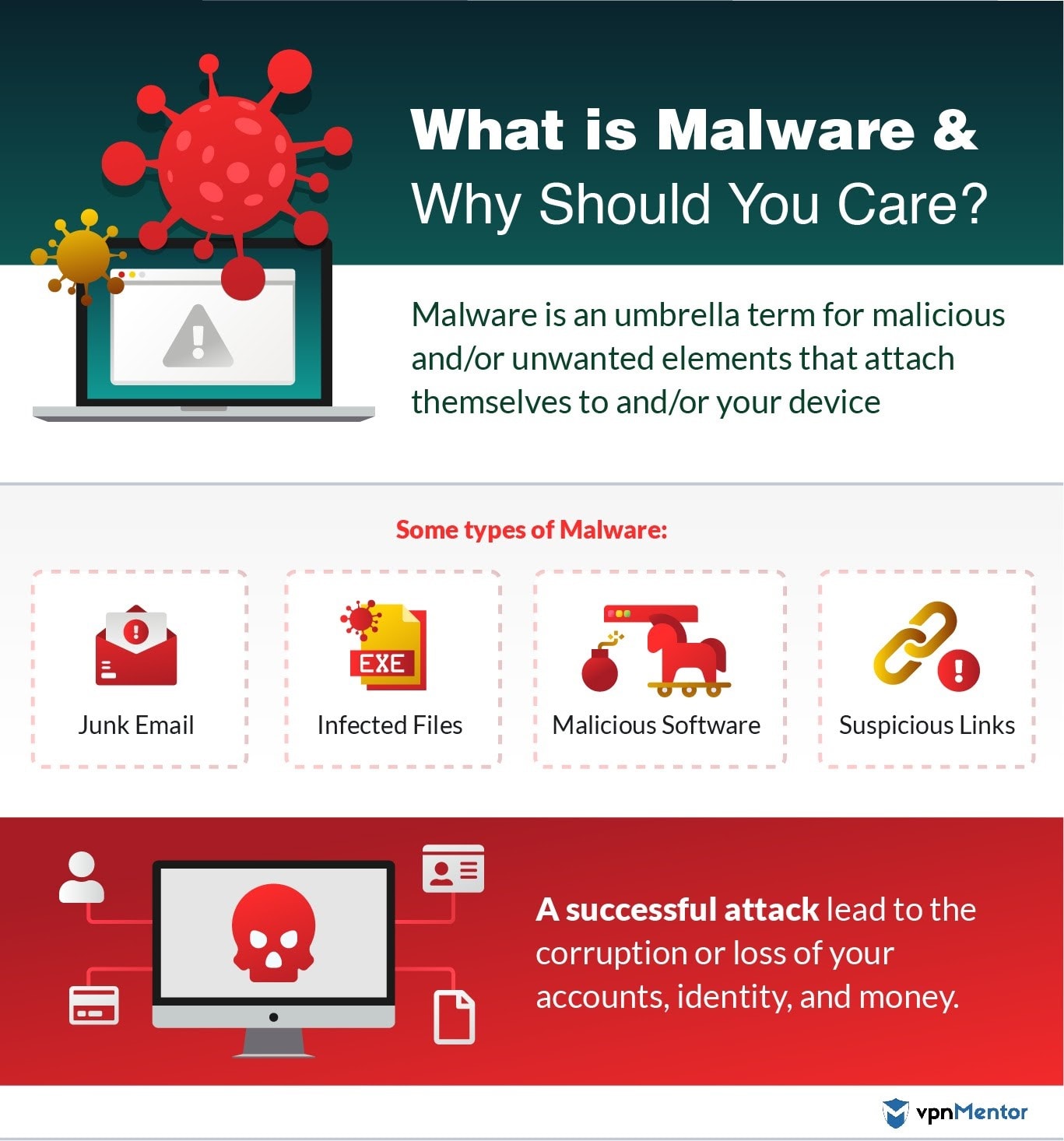
No chicken soup needed; This type of virus makes your computer sick. Instead of catching it from a sneeze or a handshake, your computer catches a virus when a computer program with the specific purpose of causing harm is installed on it. Just like the types of viruses you can catch, each computer virus has a different stain with different symptoms.
Each virus is a little bit different from every other one, and they often have funny names like Conflicker and Hongkiat. Your computer and smartphone can catch them in different ways, as the criminals who create them are exceptionally creative. It could be a link in an email designed to look like it’s from your cable company. Another virus may be in an online sign-up program for a potluck or a really tempting deal to busy, such as a cruise at a heavily discounted price. Some viruses are inside files you may accidently download, such as a Word file that claims to be warranty information or a free trip.
While your computer isn’t sent to bed for the week, viruses can damage the computer itself as well as files. Some viruses will make your hard drive not work at all anymore, while others could simply make it impossible to open the pictures of your grandkids that you have saved on your computer. Because the damages caused by a virus can mean expensive repairs or not being able to open files that are irreplaceable, it’s important to proactively protect yourself against viruses.
Here are five things you should do to keep your computer safe:
- Install all operating system updates. Sometimes when you are on your computer, a window will pop up saying that there is an update available to your operating system or Windows. Sure, it’s easy to click Cancel and keep putting it off. But every time you do that, you are putting your computer at risk for viruses. Often, the updates to the programs help keep the computer safe. An update may fix a bug that hackers are using to break into computers. Or it could install code that helps make your computer’s operating system more secure. By installing all updates as soon as you get them, your computer has a higher chance of staying healthy.
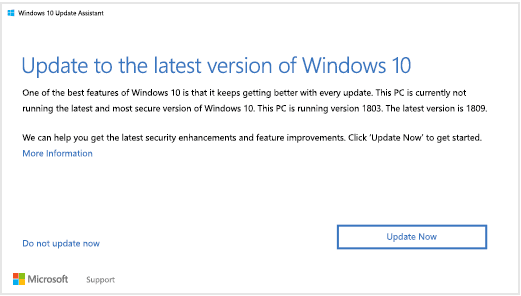 Update alert. Just install it
 - Use virus protection and keep it up to date. When you bought your computer, it may have come with a free subscription for a year for a virus protection program. You should always have a virus protection program installed on your computer. This program regularly scans your computer to detect viruses. If it finds a virus, it then gets rid of the virus and tries to repair any files that were affected. And just like your computer’s operating system, you need to keep your virus protection program as up to date as possible.
- Verify that emails are legitimate. It’s easy to think that an email carrying a virus is legitimate. These emails often look like they come from banks, utility companies, or stores – but they are fake emails that contain viruses. One of the best ways to tell if an email is real is to look at the address the email was sent from. If it’s not from an address that is from the actual company, then it may be a “phishing” email – emails that try to get you to click on them so they can install a virus on your computer or hack into your computer in some manner.
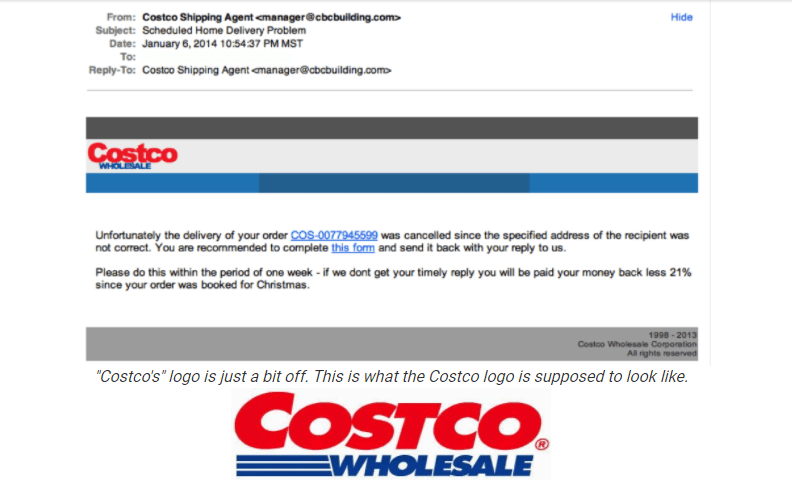 Costco? Think againAnother important way is common sense: why would your credit card company ask for your credit details or other information they already have? Even trickier, some emails may look like they are coming from your family or your contacts, if they have been hacked. If you get an email that you weren’t expecting, reach out to make sure they sent it and weren’t hacked.
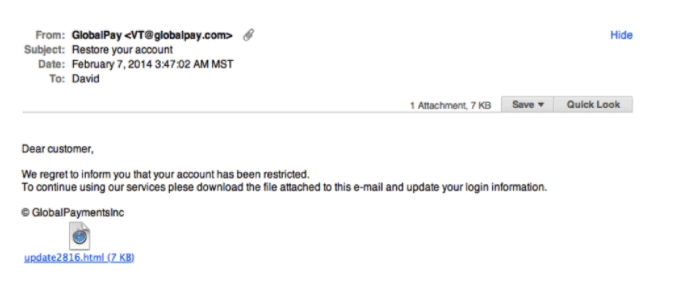 Phishing email example. Why would they ask you to download a file to reconnect?
 - Do not click on links from unknown sources. So, when you get a phishing email – and you will – make sure not to click on any links that are in the email. The links will launch a website containing the virus. When in doubt, don’t click.
- Do not open attachments you aren’t not sure are legitimate. Just like links, be very wary of attachments in emails if you aren’t 100% sure who sent them. The files are designed to look like something you would want to open, so be very selective. And check with the person who sent it if you weren’t expecting an attachment.
3. Avoiding Scams Targeted at Seniors
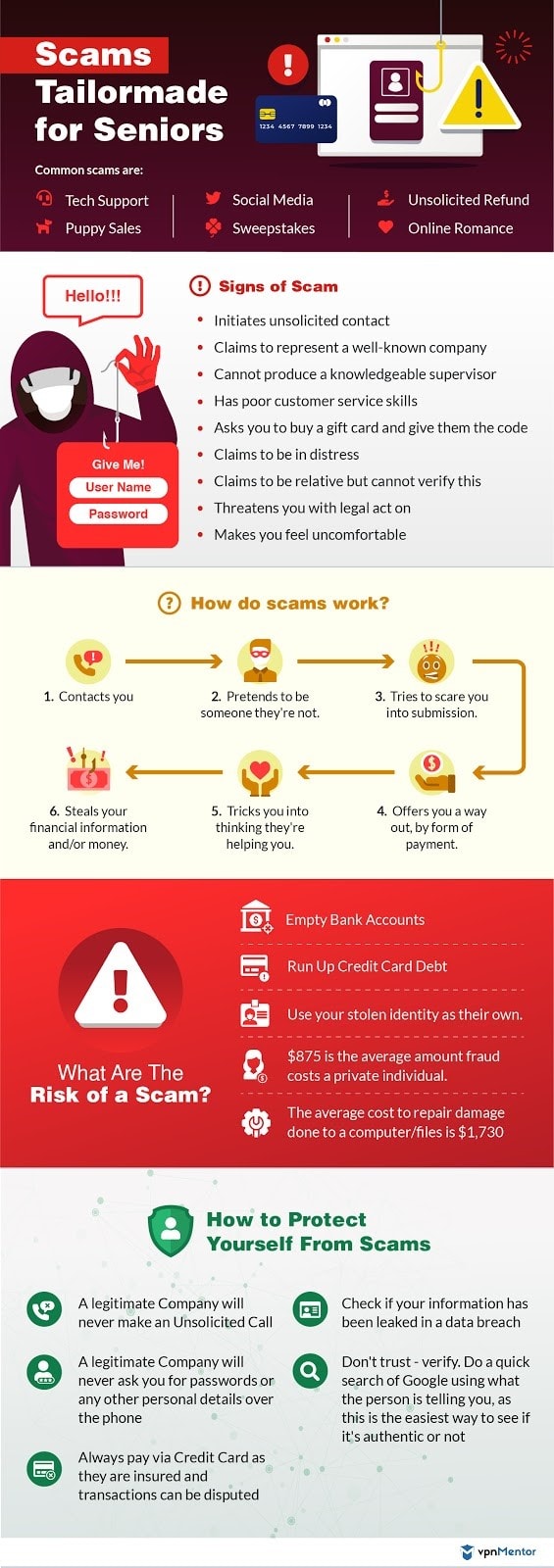
Criminals can easily tell you are a senior citizen and may target you for this exact reason. They buy this information from legitimate companies who run ads, or just see who’s active in an online community relevant to elderly users on Facebook. In the past six years, the FBI and the FTC found that cybercrimes targeted at senior citizens have increased by five times. During this time, these scams have cost more than $650 million dollars in damages.
The FBI found that seniors are more often the target because they often have money to steal, equity in their home and good credit. And if they fall for a scam, the FBI says it typically happens because they grew up in a time when these types of crimes didn’t happen and so they are more trusting. Crooks are also good at using products and services, such as health and anti aging products, that seniors are often very interested in.
And if you do fall victim to a cybercrime, it’s important to report the crime to the police and other authorities. The Aspen Institute reported that many senior citizens do not report crimes because they are embarrassed or don’t know whom to turn to. However, the only way to protect other seniors is for crimes to be reported and (hopefully!) solved.
You should also keep a close eye on any data breaches during which your information was possibly stolen. Consider setting a Google alert or reading tech news for updates, such as Wired.com. Because personally identifying information (PII) is typically stolen during breaches, criminals can use this data to commit further crimes. Many criminals take the data from the breach and specifically target senior citizens, assuming they are an easier target.
While I would love to detail all the common schemes that might be used to steal from you, such a list would likely be outdated by the time you read this. Criminals are constantly getting smarter and coming up with new scams. Instead, you should stay up to date on sites that inform seniors of current scams, such as Aging in Place, U.S. Department of Justice Senior Scam Alert and Senior Living.
4. Being Social on Facebook While Staying Safe
Are you already on Facebook? Or perhaps you aren’t, but have been thinking about it because you’ve been missing out on events and conversations. More than a third of Americans over age 65 have used a social media service, such as Facebook or Twitter. If you have been hesitating because of safety and privacy concerns, learning about ways to protect yourself may help you feel confident joining your friends and family on social media.
Here are five things you should do to stay safe on Facebook:
- Use strong passwords. Yes, I’m talking about passwords again. People get hacked on Facebook. And the best way to prevent this is to use passwords that are hard to guess using a software that tries common passwords automatically. Take a minute to go back and reread the section on passwords. Everything I wrote about passwords in general applies to Facebook too. Adding in two step authentications, such as requiring a text code for logins from new devices, can give you an extra layer of security. Remember – once the cybercriminals have access to your FB account, they can try and use it to harm your family and friends as well.
- Change your privacy settings. You control who can see your page and how much they can see. Even better, you can set privacy settings at a page level and a post level. Click on the arrow at the top right of the screen and select Settings; then click on Privacy. The most important setting to check is Who Can See Your Future Posts. If you pick anything other than Friends, then people you do not know can see your page and monitor you.
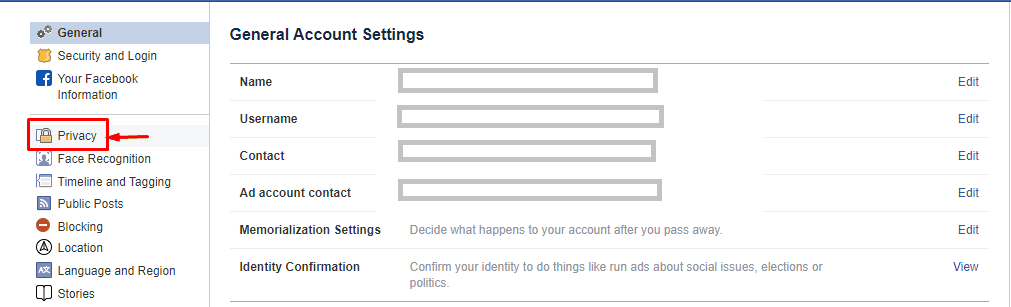 Go to the Privacy option in the settings manu
 - Keep your location private. Criminals often look on Facebook to find people to target in real life, often senior citizens. Consider leaving your location off your Facebook profile. And be careful about checking into a location (this is called a check-in), because that shows where you are at that moment. Criminals can use that information to target you at your current location or to break into your home because they know you are not home.
- Be aware of public and private messages. When you write on someone else’s wall, comment on a post or post on your own wall, then everyone who has access to the page can see what you wrote. If you want to send a private message, use Facebook Messenger, which can be seen only by the person to whom you send the message.
- Limit the information you post. To keep from being a real-life target, think about everything you post and ask whether it gives criminals information that makes you a target. If you are a woman and single, consider leaving your relationship status off your profile so people online do not know that you live alone. Also, wait to post about your vacation until you are back, people who know where you live can then easily break in.
Friending, Hiding and Blocking
Facebook is based on the concept of “friends,” which means people whom you allow to access your Facebook page. But the Facebook concept of Friend is a bit broader than you might think in real life. You should accept friend requests only from people you know. You control who is your friend. You can send invitations to people you want to be friends with, and they can request to be your friend.

While most of the people who request to be your friend are people who actually know you, be aware that you will likely receive invites from people you don’t know who want to get access to your page.
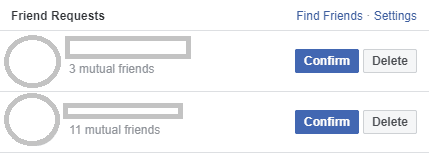
If this happens, you should decline the friend request:
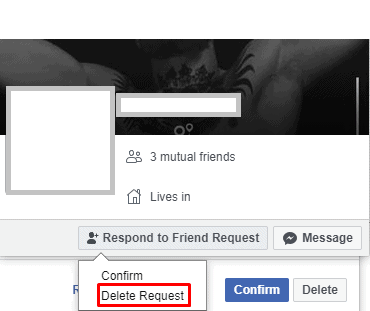
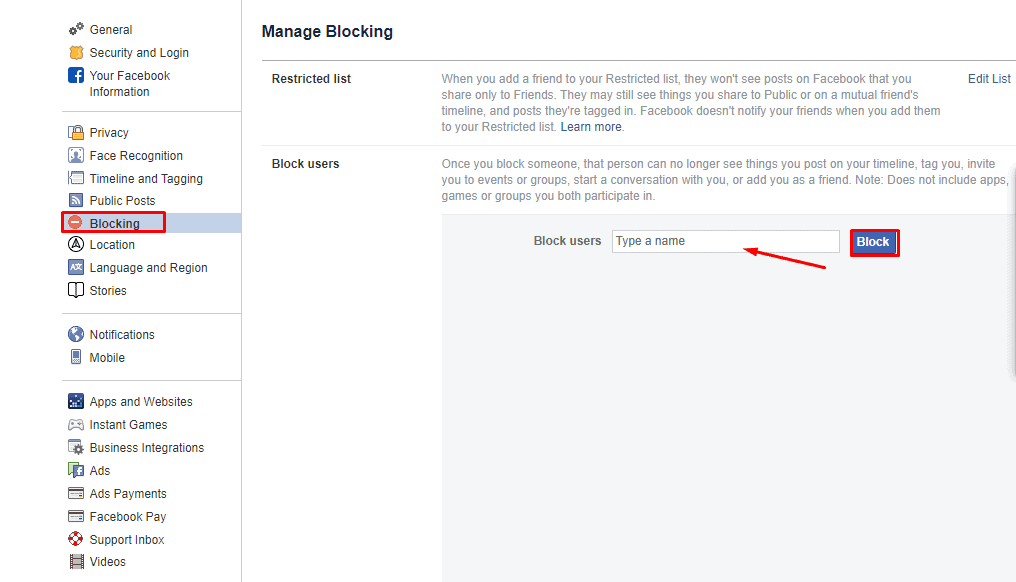
If someone persists or harasses you online, then you should move to blocking. This means you tell Facebook that you want to basically not exist to that specific person on Facebook. This means that they cannot see your page and cannot even see your comments on mutual friends’ pages. Blocking someone is a strong action and should be reserved for people you don’t know and those harassing you.
Another option is hiding, which is often a good compromise for people who are annoying to you but not dangerous. The person does not know that you have hidden their posts, but you do not see their posts on your newsfeed. You can hide someone by selecting the Hide option on the Friend button.
5. Ridesharing Apps
Are you uncomfortable driving more than a few miles from home? Have you stopped driving at night? Perhaps you are just recovering from surgery and not able to drive for a short time. Or maybe your health means you have had to put your car keys away. Ridesharing apps make it possible for you to have your independence and no longer rely on people that you know for rides. If you are in a wheelchair, Uber also offers wheelchair-accessible rides in a limited number of cities.
The way it works is that you install an application on your phone for the company; the two most popular apps in the US are Uber and Lyft. Then, when you need a ride, you open the application and put in your destination. The company uses the GPS in your phone to find out exactly where you are and calculates the cost of a ride to your destination. If this price is acceptable, you confirm that you want a ride, and then a driver will shortly be on the way. Note that companies often raise prices, called surge pricing, when rides are in high demand, such as during rush hour or at 12:30 a.m. on New Year’s Day.
Because drivers for ridesharing companies are independent contractors who use their own car, many people rightly have safety concerns. By taking the following steps, however, you can keep yourself safer while getting a ride whenever you need it:
- Check the license plate of the car. Your ridesharing app tells you the color, make and license plate of the car coming to pick you up. Before getting in the car, compare the license plate of the actual car with the plate listed in the app. Only get in the car if the plates match.
- Ask the driver who they are picking up before you get in. Often many drivers come to the same location, such as the airport or train station. To make sure that you are getting in the right car and that someone isn’t impersonating a driver, ask the driver who they are picking up before getting in the car. Companies send your name to the driver picking you up, so a legitimate driver will know your name.
- Share your position. Both Lyft and Uber let you share your exact physical position with a friend or family member. This gives an added safety measure because someone knows where you are at all times.
- Know how to use the alarm. Most apps also include a feature that allows you to send a silent alarm to the company indicating that you feel unsafe. Typically, the company immediately contacts the authorities to provide you with help.
6. Online Shopping: Buy What You Need Without fearing scams
Getting out of the house to go to the store can be challenging, especially if you are not feeling well or the weather is bad. By using online shopping, you can order everything you need – clothes, groceries, prescriptions – and have it all delivered right to your door. In addition to not having to drive, you can often save money by comparing prices from your living room couch instead of driving to multiple stores. Many seniors who are no longer driving find online shopping a good way to maintain their independence and not have to rely on others for basics.
Here are a few tips for smart online shopping:
- Factor shipping into the price. Check how much the shipping costs before purchasing, and consider whether the purchase is worth the entire amount. Many sites offer free shipping over a certain amount or free shipping with the store credit card.
- Look for coupons. Many retailers offer online coupon codes. Be sure to search online for a current code before purchasing. Sometimes the retailer advertises the code on its site but sometimes you need to search online.
- Look at the ship date. If you want to buy Christmas decorations, for example, make sure they will arrive before Christmas. While many items have quick shipping, products can be backordered and delayed several weeks.
- Check return policies before purchasing. Some stores, such as Amazon, pay for return shipping. However, others require you to pay for return shipping if you do not want to keep the product.
But you may be wondering if shopping online is safe. While there is a risk with any form of shopping – for example, someone standing behind you at the grocery store could steal your credit card information – you can limit your risk by taking a few precautions:
- Buy online from familiar sites. Because nondelivery of goods bought online is a common crime, consider buying only from stores that you know and that have a solid reputation. Be extra suspicious of unknown stores that send you an email advertisement. Make sure it’s https// and not http, as well as a real URL and not a fake site.
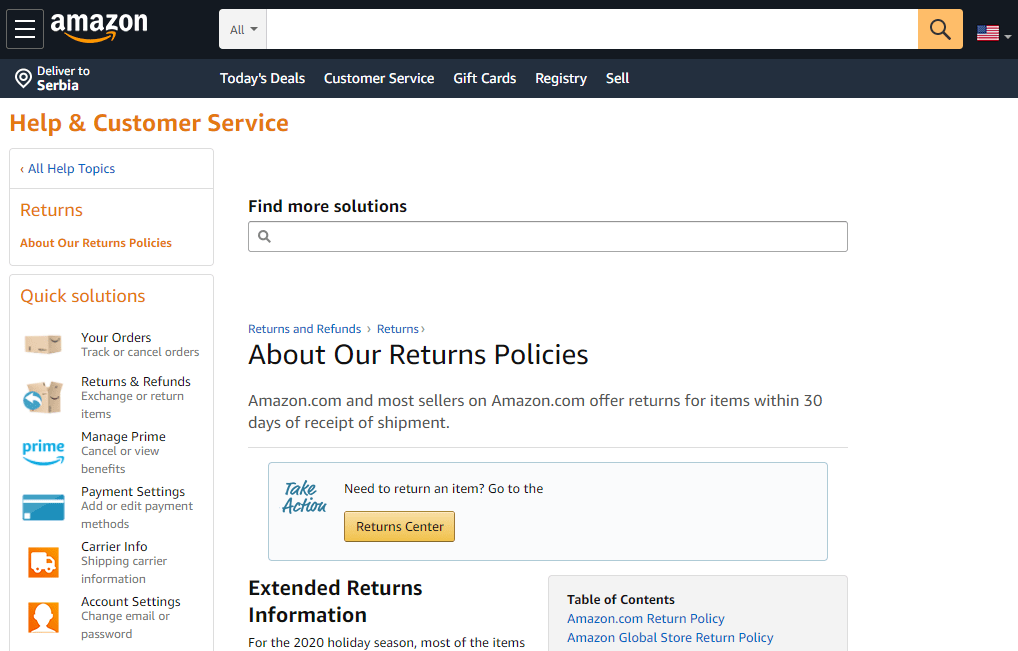 Amazon would be a safer bet than some nameless online shop
 - Use your credit card to pay. Instead of using a debit card, use a credit card or PayPal whenever possible. Most credit cards offer protection against fraudulent purchases, which helps put your mind at ease.
- Do not store your payment information in your account. Many sites give you the option to save your credit card number in your account. This means that anyone who accesses your account can buy products using your card. While it can be a pain to enter your card number each time, it gives you an extra layer of safety.
- Do not shop online over public internet or cellular service. Wait until you are on a private wireless network, such as the one at your home, that is password protected. Criminals often try to intercept credit card information and other data over public networks. You can also use a Virtual Private Network, which is either a free or paid service that protects your internet traffic.
- Use strong passwords. Yes, I know, I’ve said it before. But it matters a lot with online shopping, especially if you didn’t listen to my advice about not storing your credit card number in your account.
Not Just Pizza: Food Delivered to Your Doorstep
It used to be that if you didn’t want to leave your house – either because you no longer drove, were not feeling well or just didn’t feel like putting on pants – your only choice was pizza. But new food delivery services, such as DoorDash and Uber Eats, now let you order food from a wide range of restaurants and have it delivered to your door.
To order food, find out which companies serve your area and download the app on your phone. Find the restaurant you want and order the food, and then the charges are put on your credit card number stored on your phone. While the service is convenient, the delivery fee is often hefty, especially compared with the price of the meal. You should also tip the driver using the app; you enter the percentage or amount, and it’s added to your bill. Ubereats is one of the services you can use
Because food delivery apps bridge the online and the physical worlds, criminals can use these services to commit both physical and online crimes. Keep the following tips in mind:
- Create strong passwords. I won’t preach anymore.
- Make orders over secure and private networks. By intercepting the order, criminals often can access your credit card information.
- Leave your porch light on, and do not let the delivery person into your home. For extra safety, close the door behind you when you step out onto the porch.
- Let a friend or family person know a delivery person is on the way. Tell them the company you used and even the delivery person’s name if you know it.
7. Protecting Yourself from Data Breaches
You have likely heard about data breaches, which is when a company’s data – potentially including customers’ personal information – is exposed (intentionally or unintentionally) for anyone who can find it to see. Unfortunately, criminals often target seniors by using the information available in data breaches.
Here are a few ways to protect yourself from this type of risk:
- Be careful of phishing. Yes, I’ve already mentioned it. But it’s one of the most common ways criminals steal information. And it’s very easy to fall prey.
- Lie about your age online. I’m not talking about important forms or dating sites, just retail sites collecting information. This way if a criminal is targeting older consumers, then your information may be safe.
- Use Paypal instead of a credit card. Because your credit card data is not shared with the retailer when you use PayPal, you are more protected against breaches.
8. Finding Love (or Even a New Friend) Online
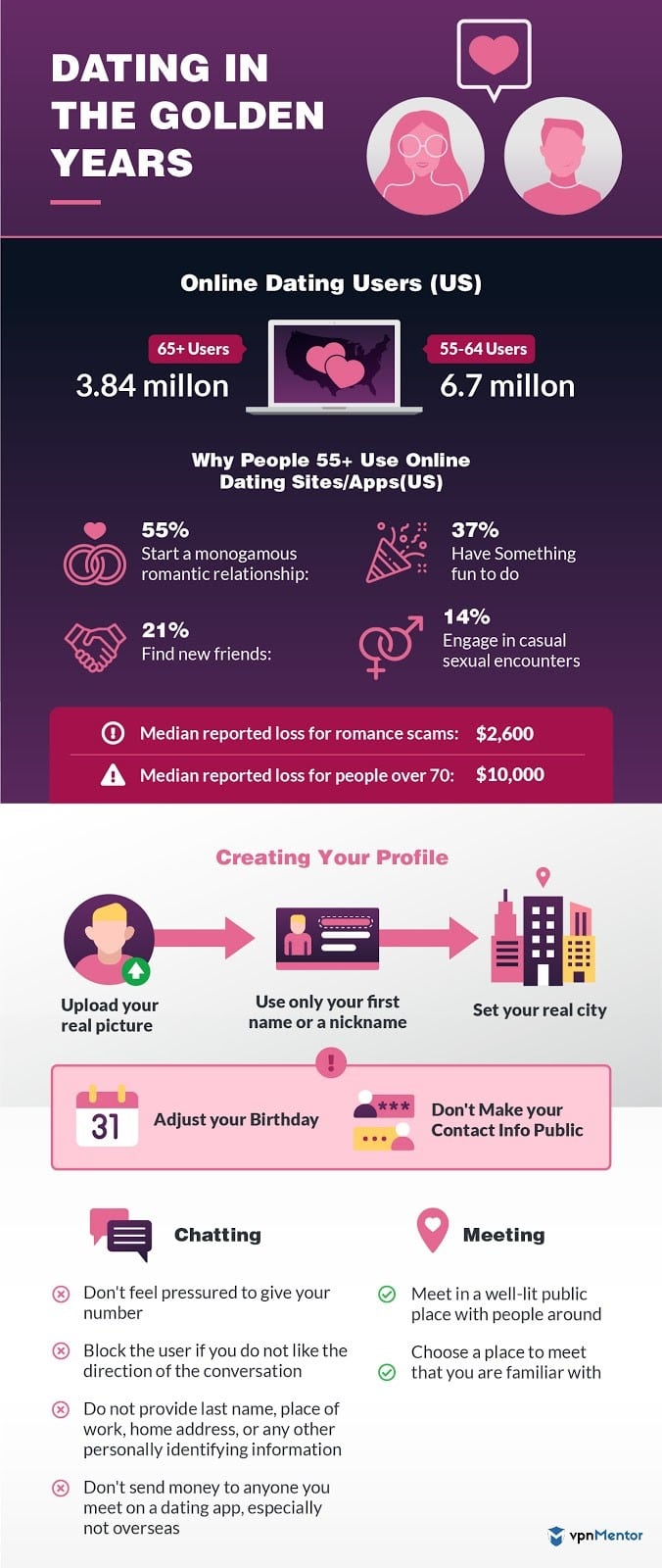
The internet is often blamed for isolating people, but technology also helps connect people. If you are looking to make new friends or find a partner, you can now use the internet to help meet new friends. But it’s not just online friends; you can find people online that you are likely to connect with in real life and arrange a meeting.
Yes, many seniors are using online dating. I promise you won’t be the oldest person on the site. Seniors find it’s a good way to meet people outside their social circle, which can be helpful especially after becoming widowed or divorced.
Because you may be getting back into the dating game after years of marriage, it can also be a low-pressure way to look for new friends. Yes, it’s very different from how you dated growing up, but once they get used to it, many seniors find that it is easier to meet people outside their current social circle.
The first step to online dating
Since older adults might feel disheartened browsing through profiles of younger individuals, it’s advisable to use dating websites tailored for seniors, such as OurTime and SilverSingles. While most of these platforms have a fee, there are also some free options available for online dating. Before signing up, make sure to review the duration of the site subscription and the cancellation terms carefully.
Each site works a little differently, but all sites have a profile that you create, sharing who you are and what you are looking for. You should include a picture that is flattering but realistic about how you look – no pictures from 20 years ago. Then you can browse profiles and reach out to other people as well as communicate with members who reach out to you. For safety, be sure to not post your email, physical address or phone number on your profile.
Once you chat with someone online and would like to take it into real life, keep these safety tips in mind:
- Meet in a public location during daylight hours. Many seniors meet people from online dating sites at coffee shops during the day. If it’s not a match, then you are not stuck for a lengthy and expensive meal.
- Do not go to their house or in their car on the first date. Stay in the public location, and drive your own car or Uber there.
- Tell a friend or family member where you are and who you are with. This way, if you don’t return on time, someone will know where to start looking. You can also share your location from your phone so they know where you are in case of any issues.
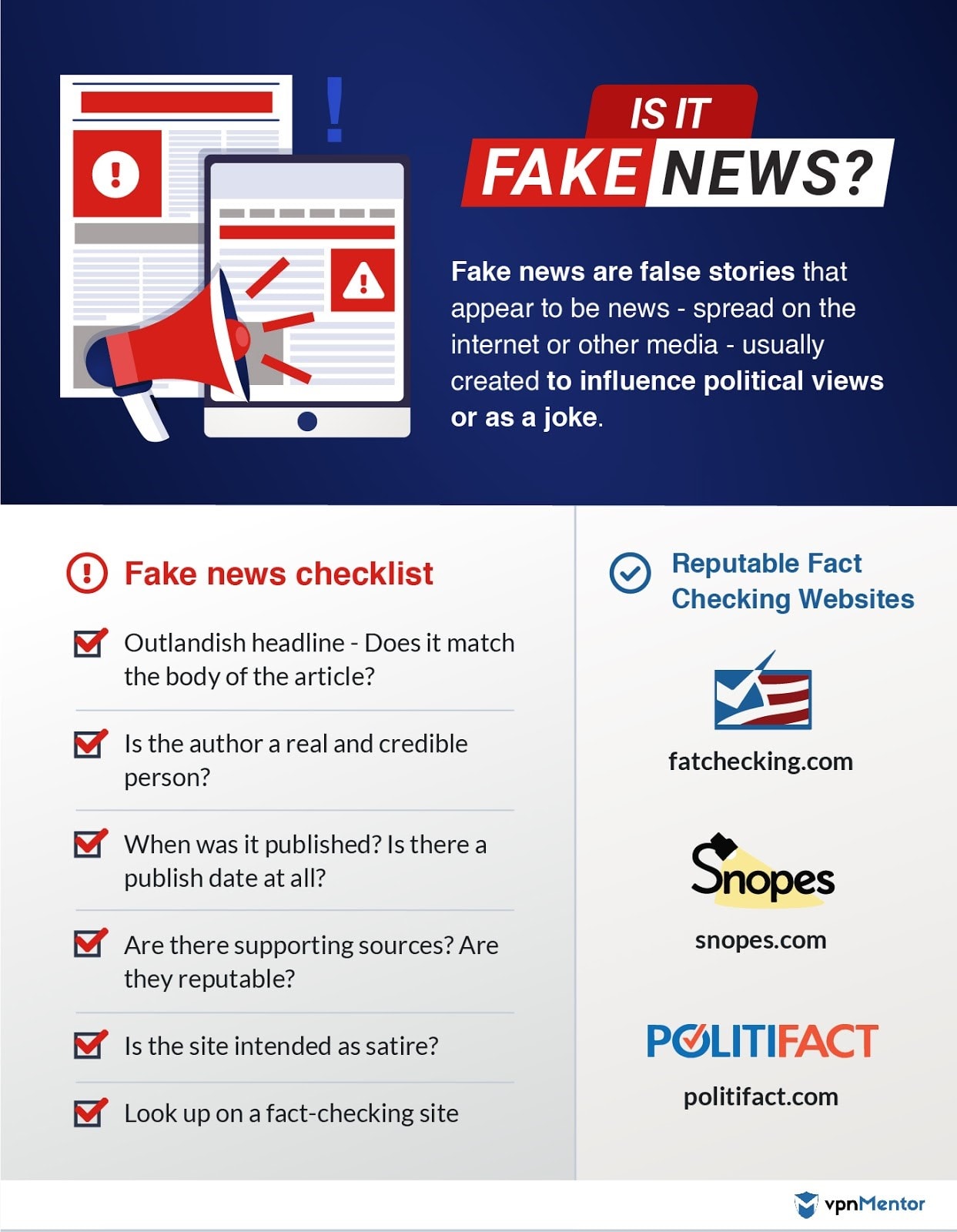
9. Spotting Fake News Online
It used to be easy to know which news sources to believe – your town’s newspaper, the local TV station and cable news stations. But with the internet, anyone can create a website and write whatever they want. Often advertisers create websites or posts that are biased to convince people to buy a product or service. People with political agendas on both sides also create sites and report stories in an unbalanced way.
Today, part of reading news is determining if it is accurate and fairly reported. Look to see if anything on the site or page notes it is a paid advertisement. This is a sure clue that the story is not fairly reported and should be taken with a grain of salt. Reading news from known and reputable sites has a much higher likelihood of accuracy.

However, carefully look at any website, because fake news sites are often designed to look like real media sites. Check the URL carefully, because often the URL is similar but not the same in order to get people to click. You can also check any news from unknown sites with reputable and known news sites. Here are some useful tips for avoiding missinformation:
- Look for every news piece’s source. Is connected to an interest group? Is it even mentioned, and not just portrayed as “sources claim”?
- Think about Political players who gain value from that news piece. Are they also an only source for that story? Do they have a history of dubious claims or misinformation?
- Remember that incredible claims require irrefutable proof. Don’t fall for fear mongering that has no professional and scientific backing.
10. Getting Help Using Technology
Everyone needs help navigating technology. Don’t feel embarrassed or dumb because you get stuck. All the technology you are trying to use has existed for only a short time. Here are some places to go to learn more about technology or get help with an issue:
- Children. Your grandkids or your neighbor’s kids have never known a world without computers, the internet and smartphones. Ask them to help you solve a problem or use a new program. And even better – you’ll have quality time to spend together.
- Senior centers. Many centers or community rec centers offer computer and technology classes for seniors. The classes are often reasonably priced and geared toward learning tasks that you are likely to use with technology.
- Online courses. Check out the free classes offered by GCFLearnFree.org and TechBoomers.com. This is a great way to learn more without having to leave your house.
Bottom Line
Yes, it can feel overwhelming. And yes, you have to take precautions to stay safe while online, just like you lock your doors in real life. But learning to use technology has so many benefits – staying connected, maintaining your independence and meeting new people. I promise that if you take the time and make the effort to embrace technology, you will be very happy with the results.
Maine Veterans’ Dental Network
 In 2021, the Maine Bureau of Veterans’ Services founded the Maine Veterans’ Dental Network (MVDN) through a pilot grant from Northeast Delta Dental. The original $35,000 grant and subsequent partnership with Northeast Delta Dental, participating dental clinics and Federally Qualified Health Centers provided dental services to Maine’s veterans who otherwise could not afford them. Since its inception, the goal of the MVDN program is for veterans to become established patients with a community dentist. Northeast Delta Dental followed up its pilot grant with another $300,000 donation to the program in 2021 and 2022. The Maine Masonic Charitable Foundation also donated $30,000 in 2023 and the Network’s services have since been expanded through the addition of Maine’s dental teaching schools. The MVDN program provides a yearly grant to those veterans who qualify. Eligible veterans who submit their completed application will be connected with a dental clinic in their county that will schedule an appointment for them. The program is on a first come, first served basis until funding in the veteran’s county has been exhausted; and it is not meant to supplement existing dental insurance. For more information about the program, visit the Bureau’s website. Those looking to apply for the program can access the application page here. In 2021, the Maine Bureau of Veterans’ Services founded the Maine Veterans’ Dental Network (MVDN) through a pilot grant from Northeast Delta Dental. The original $35,000 grant and subsequent partnership with Northeast Delta Dental, participating dental clinics and Federally Qualified Health Centers provided dental services to Maine’s veterans who otherwise could not afford them. Since its inception, the goal of the MVDN program is for veterans to become established patients with a community dentist. Northeast Delta Dental followed up its pilot grant with another $300,000 donation to the program in 2021 and 2022. The Maine Masonic Charitable Foundation also donated $30,000 in 2023 and the Network’s services have since been expanded through the addition of Maine’s dental teaching schools. The MVDN program provides a yearly grant to those veterans who qualify. Eligible veterans who submit their completed application will be connected with a dental clinic in their county that will schedule an appointment for them. The program is on a first come, first served basis until funding in the veteran’s county has been exhausted; and it is not meant to supplement existing dental insurance. For more information about the program, visit the Bureau’s website. Those looking to apply for the program can access the application page here. |
Senior Food Program
| Enrollment opens for senior food program |
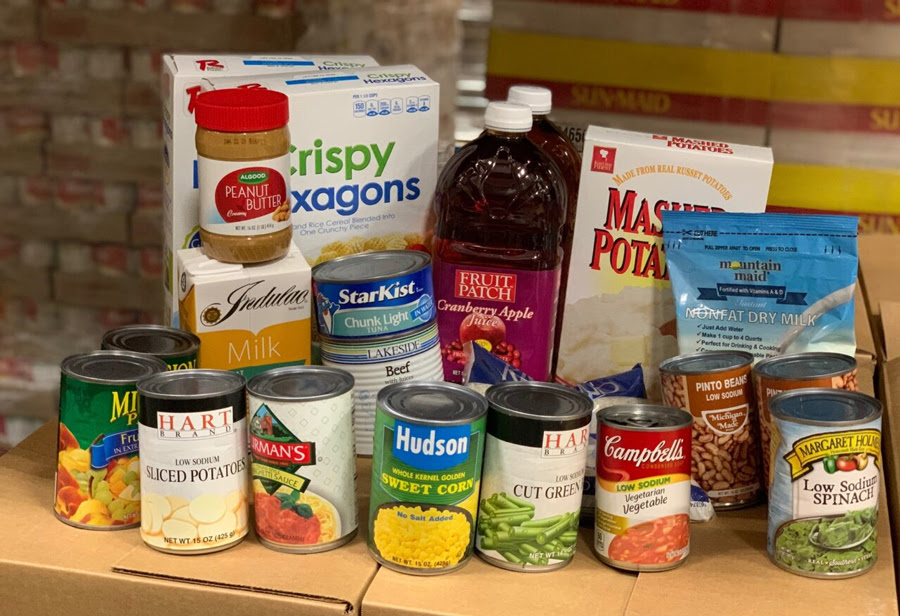 The enrollment process for the Maine Department of Agriculture, Conservation and Forestry’s (DACF) Maine Senior FarmShare Program (MSFP) has opened for the year. The program allows low-income older adults to receive up to a $50 share of fresh, local produce directly from Maine farmers at no cost. Eligible participants can sign up directly with one of more than 100 farms in all 16 counties that are authorized to participate. The program is on a first come, first served basis – those who sign up will be placed on a waiting list if their preferred farm is full. To participate, Maine residents must be aged 60 or older – or aged 55 or older for Native Americans – and meet income eligibility guidelines. Participants must re-enroll yearly and may only sign up with one farm annually. Those who are interested in participating can fill out an online form for more information and an interactive map is also available online that identifies participating farms. Eligible adults can also call their Area Agency on Aging at 1-877-353-3771. DACF’s other program for seniors, the Commodity Supplemental Food Program (CSFP), known colloquially as the Senior Brown Bags or Senior Boxes, is another federal program to help improve the health of low-income elderly Mainers. DACF collaborates with organizations statewide to supplement the nutrition of about 8,000 seniors through the program. Each food box, valued at $50 and freely available to eligible seniors, contains a variety of canned fruits, vegetables, meat, fish, poultry, pasta, rice, peanut butter, juice, shelf-stable milk, cereals, and cheese. Participating seniors pick up their boxes at a designated time and place each month. Seniors need only be aged 60 and older, live in Maine and meet income guidelines. To apply, view the list of supporting agencies and contact the one serving your county. For more information about the CSFP program, visit the program’s website. The enrollment process for the Maine Department of Agriculture, Conservation and Forestry’s (DACF) Maine Senior FarmShare Program (MSFP) has opened for the year. The program allows low-income older adults to receive up to a $50 share of fresh, local produce directly from Maine farmers at no cost. Eligible participants can sign up directly with one of more than 100 farms in all 16 counties that are authorized to participate. The program is on a first come, first served basis – those who sign up will be placed on a waiting list if their preferred farm is full. To participate, Maine residents must be aged 60 or older – or aged 55 or older for Native Americans – and meet income eligibility guidelines. Participants must re-enroll yearly and may only sign up with one farm annually. Those who are interested in participating can fill out an online form for more information and an interactive map is also available online that identifies participating farms. Eligible adults can also call their Area Agency on Aging at 1-877-353-3771. DACF’s other program for seniors, the Commodity Supplemental Food Program (CSFP), known colloquially as the Senior Brown Bags or Senior Boxes, is another federal program to help improve the health of low-income elderly Mainers. DACF collaborates with organizations statewide to supplement the nutrition of about 8,000 seniors through the program. Each food box, valued at $50 and freely available to eligible seniors, contains a variety of canned fruits, vegetables, meat, fish, poultry, pasta, rice, peanut butter, juice, shelf-stable milk, cereals, and cheese. Participating seniors pick up their boxes at a designated time and place each month. Seniors need only be aged 60 and older, live in Maine and meet income guidelines. To apply, view the list of supporting agencies and contact the one serving your county. For more information about the CSFP program, visit the program’s website. |
Fraud Continues at Historic Levels
| The numbers are in, and 2023 was another record-breaking year for fraud. According to the Federal Trade Commission’s 2023 Sentinel Data Book, reported theft through fraud topped $10 billion. The rise from $2.4 billion in 2019 – before the pandemic — is a staggering 317%. While these numbers illustrate that fraud continues to soar across the U.S., they only reveal a fraction of actual theft from fraud, since the crime is notoriously underreported. More than anything, the report shows that nobody is immune to fraud, a threat that continues to evolve in both scale and sophistication. |
| Impostor Scams Still on Top• Over 850,000 consumers reported experiencing impostor scams, with 1 in 5 suffering financial losses.•In these prevalent scams, criminals pretend to be a trusted person, company, or government agency — a bank, known business, celebrity, or a relative in trouble. They convince the target of some untruth to coerce them into making a financial transaction or sharing information that allows the criminal to access and wipe out financial accounts. Theft Through Investment Scams Soared• Investment fraud victims reported theft of a staggering $4.6 billion, surpassing all other types of fraud. Reporting victims in this category experienced median losses of $7,700.•Many of these scams involve cryptocurrency fraud, which has taken a quantum leap in recent years, where it is used both as a form of payment and as the commodity of choice in sophisticated investment schemes. Criminals Know No Bounds• Most people believe that scams only happen to older adults. The reality is that younger people report losing money to fraud more often, with 44% of reports coming from those age 20-29. But when older adults are the victim, they lose so much more. •Email was the most popular contact method reported. However, social media-based scams led to the highest reported overall dollars stolen, and phone calls resulted in the highest amount stolen per victim.•It is more important than ever to stay up to date on the latest scams and share what you know to help protect others. |
| Reprinted from AARP Fraud Watch Network |
IRS Imposter Scams
| How It Works• You receive an unexpected call, text or email that claims to be from the IRS.•They may say you owe unpaid taxes and threaten arrest if you don’t pay immediately.•They’ll demand payment via wire transfer, prepaid debit cards, cryptocurrency, or by purchasing gift cards and sharing the numbers off the back.•Or the IRS might have good news: you have a refund coming, which you can claim by clicking a link or calling a specified phone number and providing personal information. What You Should Know• IRS impostor scams often begin with a robocall, instructing you to press a number on your keypad to talk with a live agent or call back using the number provided.•Scammers can manipulate caller IDs to appear as though the call is coming from the IRS.•The real IRS initiates communication by mail, including in cases of delinquent taxes. The agency may contact you by phone only after you have received and not responded to multiple written notices.•Federal agencies never request payment via wire transfer, cryptocurrency, or gift card. In 100% of these scenarios, it is a scam. What You Should Do• If you get a call claiming to be from the IRS, hang up — or better yet, don’t pick up the call to begin with.•If you want to confirm your tax payment status, call the IRS directly at 800-829-1040.•Forward any unsolicited emails or texts in which someone claims to be from the IRS or the Treasury Department to [email protected]. Do not click on any links or open attachments.•Know that beyond IRS impostors, tax ID fraud is still a problem. Consider obtaining an IRS identity protection PIN. The IP PIN is known only to you and the IRS, and your return cannot be processed without it. |
| Reprinted from AARP Fraud Watch Network. |